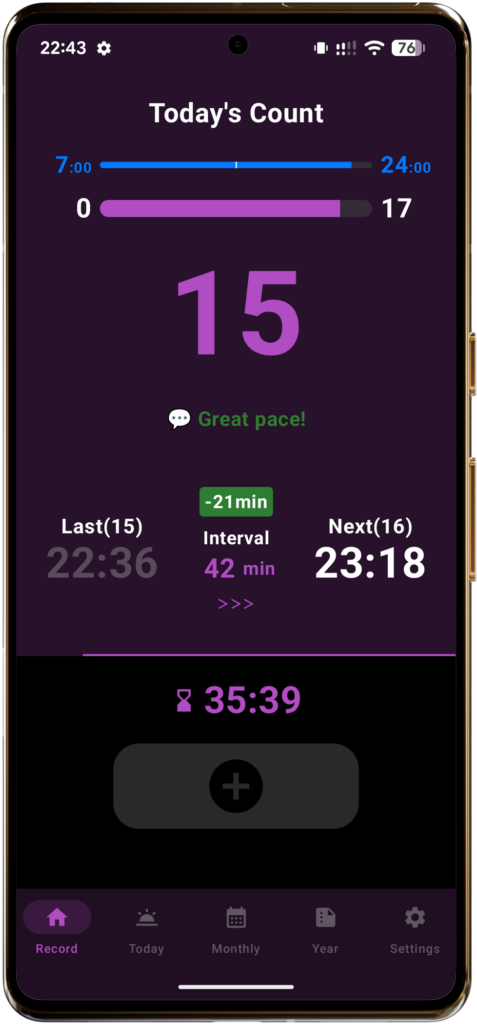
Thank you for visiting the information page for SmokeTimes, a smoking management app.
SmokeTimes helps you keep track of the number and timing of your cigarettes and includes a Smoking Pace Guide designed to help prevent “smoking too much.”
In SmokeTimes, “smoking too much” means exceeding the Daily Target you set for yourself.
This app is not designed to push you into drastic reductions or quitting smoking. Instead, it helps you keep your smoking within the Daily Target you have chosen.
By gradually lowering your Daily Target, you can also use SmokeTimes to work toward cutting down at your own pace.
On this page, we’ll first explain the general process of cutting down on smoking, followed by practical ways to use SmokeTimes as part of that process.
1 The Process of Cutting Down – Start by Avoiding “Smoking Too Much”
If you smoke, you have probably thought at least once, “I should quit” or “I should try to smoke a little less.”
However, changing long-established smoking habits—such as smoking at certain times of the day—or unconscious smoking, where you find yourself lighting up almost automatically, is never easy through willpower alone.
To continue cutting down without putting too much pressure on yourself, rather than trying to reduce your cigarette count drastically from the start, it is important to begin by focusing on not smoking more than usual.
One possible step-by-step approach is to first understand your current smoking habits, set a manageable goal, and become accustomed to staying within that goal. Once that feels comfortable, you can gradually begin reducing the number of cigarettes you smoke.
(1) First, understand how much you currently smoke (Baseline)
The first step is to get an accurate picture of your current smoking habits. How many cigarettes do you smoke each day? How much time usually passes between cigarettes? Are there certain times of day when you tend to smoke more frequently?
It can also be helpful to look objectively at routine smoking occasions, such as having a cigarette with your morning coffee or after a meal.
(2) Start by maintaining your current level, then gradually reduce it (Goal)
Once you understand your current smoking habits, the next step is to set a goal. The important point here is not to try to make a large reduction right from the start.
For example, if you normally smoke about 20 cigarettes a day, you could begin by setting a goal of “not exceeding 20 cigarettes.”
This does not reduce your cigarette count yet. Instead, the idea is to use your current smoking level as an upper limit and first prevent yourself from smoking more than usual.
Once you become comfortable staying within that limit, you can move on to the next stage by gradually lowering your goal to 19 cigarettes, then 18, and so on.
Start by avoiding “smoking too much.” Once you can do that comfortably, gradually reduce the number of cigarettes you smoke. This is one possible way to work on cutting down at a manageable pace.
(3) Pay attention not only to the number of cigarettes, but also to the time between them (Practice)
Once you have set a goal, try to keep it in mind during your daily smoking routine.
However, if you focus only on thinking, “I only have this many cigarettes left today,” you may end up concentrating too much on the feeling of having to hold back.
Another approach is to pay attention to the interval between cigarettes. After smoking one cigarette, try allowing a little more time before the next one. Repeating this throughout the day can make it easier to keep your total cigarette count under control.
(4) Review your target regularly (Reassessment)
Once you are able to stay within your current target without too much difficulty, you can consider the next step.
For example, after maintaining your current target for a certain period of time, you might try reducing it by one cigarette.
Rather than making a large reduction all at once, the key is to check how you are doing and lower your target gradually.
2 Getting Ready to Cut Down with SmokeTimes
Now, following the process explained in the previous section, let’s look at how you can use SmokeTimes to start cutting down.
Before you begin, the first step is to set your Daily Target. Your Daily Target can be the same as the number of cigarettes you currently smoke each day. You can also choose to set it slightly lower than your current level.
For example, if you normally smoke about 20 cigarettes a day, you could start by setting your Daily Target to 20 cigarettes and simply aim not to exceed 20.
What matters is not choosing a number based only on other people’s opinions or financial reasons, but starting with a target that reflects your current smoking habits and feels manageable for you.
First, focus on staying within the Daily Target you have set. Once you can do that comfortably and consistently, you can move on to the next stage by gradually lowering your target.
“First, avoid smoking too much. Then, once you get used to that, gradually cut down.” By taking things one step at a time, you can work on cutting down at a pace that suits you.
2-1【Step 1】Check Your Current Smoking Habits
Start by understanding your current cigarette count and smoking pace. Record your current smoking activity and take a look at how you normally smoke throughout the day.
SmokeTimes includes a dedicated feature for this purpose called Baseline Mode. In this mode, the app temporarily disables its pace-guidance features, including the Daily Target, smoking interval calculations, Next Time guidance, and smoking pace displays.
With no pace guidance from the app, you can record your cigarettes at your usual, natural timing. Start by using Baseline Mode for a few days to about a week and record your smoking as you normally would.
■ How to Use Baseline Mode
- Turn it on: Open the Settings screen from the Settings tab, then switch Baseline Mode to On.
- Record your smoking: Whenever you smoke, simply tap the Count button at the bottom of the main screen.
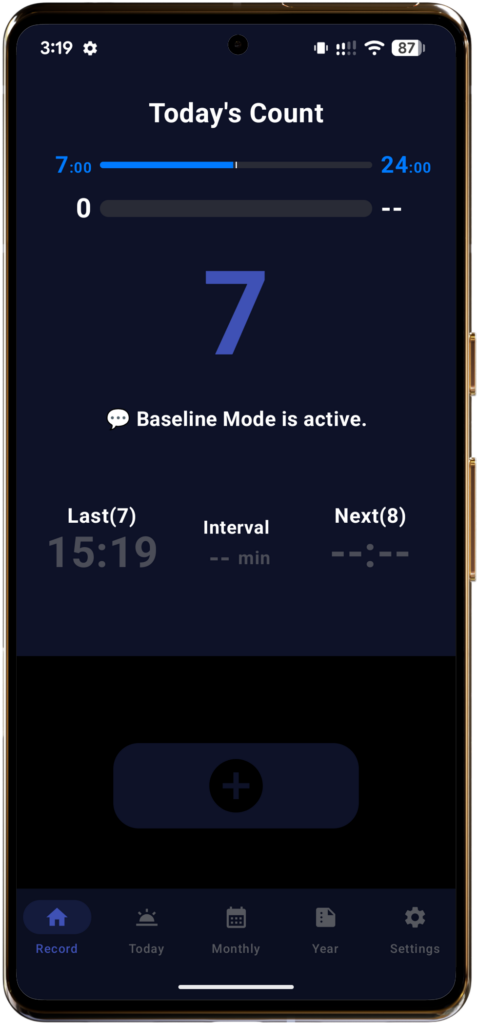
📱 Baseline Mode
- The Daily Target cannot be set.
- The Count Period can still be set, and the time progress bar continues to operate.
- The cigarette count progress bar is paused. Last (the most recent smoking time) is still displayed.
- The Target Interval calculation, which adjusts the smoking interval based on your pace for the day, is paused.
- Next Time guidance is paused.
- Your smoking records are still saved, including smoking times, actual smoking intervals and their average, daily cigarette counts, and daily averages.
- The theme color remains fixed in blue tones.
2-2【Step 2】Set Your Daily Target
After recording your smoking for several days, check the Daily Average shown near the bottom of the Monthly screen. This gives you a useful reference for understanding how many cigarettes you currently smoke per day.
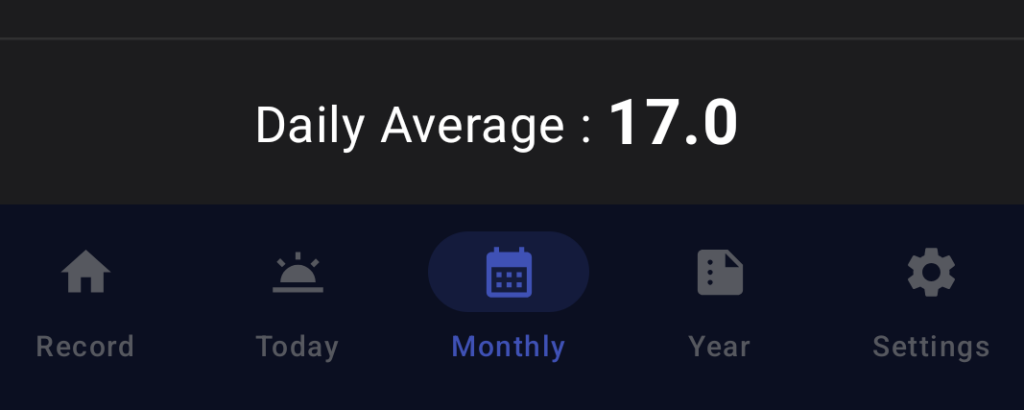
For example, suppose your Daily Average is 17.0 cigarettes.
If your first goal is to build the habit of not smoking too much, set your Daily Target to the same level as your current average: 17 cigarettes.
Example 1: Daily Average 17.0 → Daily Target 17
(First, aim to stay within 17 cigarettes and avoid smoking an 18th cigarette.)
Once you become comfortable staying within your current level, you can move on to the next stage and set a slightly lower target, such as 16 cigarettes.
Example 2: Daily Average 17.0 → Daily Target 16
(Aim for one cigarette fewer than your current level.)
In SmokeTimes, the Daily Target is simply the maximum number of cigarettes you decide you want to stay within each day.
Once you have chosen your Daily Target, switch Baseline Mode back Off, then enter your Daily Target on the Settings screen. From this point, SmokeTimes begins providing its smoking pace guidance.
The default Daily Target is 17 cigarettes.
💡 How Many Cigarettes Should You Cut from Your Current Level?
Once you are ready to move beyond simply maintaining your current level and start cutting down, you may wonder, “How many cigarettes should I reduce my target by?” A good starting point is to reduce it by just one cigarette.
You might think, “Only one? Isn’t that almost the same as staying where I am?” However, even reducing your target by a single cigarette can make a noticeable difference in the smoking interval—the amount of time you wait before your next cigarette.
For example, let’s assume your daily Count Period is 16 hours.
- With a Daily Target of 17 cigarettes, the smoking interval is about 60 minutes.
- With a Daily Target of 16 cigarettes, the smoking interval is about 64 minutes.
That means you wait about 4 minutes longer each time before your next cigarette. If you smoke 16 cigarettes in a day, there are 15 intervals between them. Repeating that extra 4-minute wait across 15 intervals adds up to 60 additional minutes of waiting time over the course of the day.
If you casually lower your target by two, four, or even more cigarettes at once, you can see how much additional waiting time that may create throughout the day.
To make cutting down easier to continue and turn into a habit, reducing your target gradually—one cigarette at a time—can be a practical approach.
2-3【Step 3】Set Your Count Period
Next, set the time period during the day when you normally smoke. On the Settings screen, enter the following two times.
🕰️ Count Start Time:
Set this based on the time you wake up or the time you usually smoke your first cigarette of the day.
You can select a time from 0:00 to 12:00 in one-hour increments. The default setting is 7:00.
🕰️ Count End Time:
Set this based on the time you go to bed or the time you usually smoke your last cigarette of the day.
You can select a time from 13:00 to 24:00 in one-hour increments. The default setting is 24:00.
Based on the Start and End Times you set, SmokeTimes uses the following concepts:
⚫︎ Within the Count Period:
This is the period from the Count Start Time to the Count End Time.
During this period, the app’s pace-guidance features are active. The Start and End Times you set are also displayed at both ends of the time progress bar on the main screen.
⚫︎ Outside the Count Period:
This refers to the time from 0:00 to the Count Start Time, and from the Count End Time to 24:00.
The app’s pace-guidance features are paused during these times, but you can still count and record cigarettes.
⚫︎ Count Duration:
This is the length of time, in minutes, from the Count Start Time to the Count End Time.
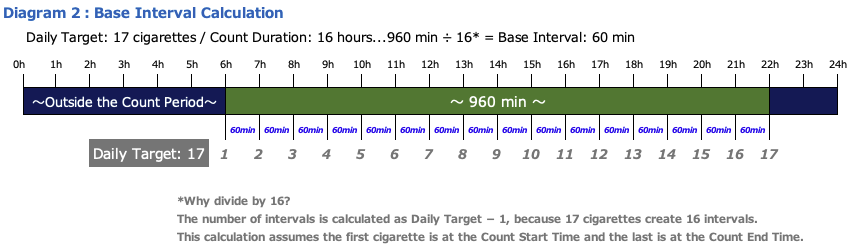
For example, if you set the period from 6:00 to 22:00, the Count Duration is 16 hours (960 minutes).
This duration is used to calculate values such as the Base Interval, Target Interval, Next Time, and Average Interval.

2-4【Step 4】Check Your Base Interval
Once you have set your Daily Target and Count Period, SmokeTimes calculates your own basic smoking interval, called the Base Interval.
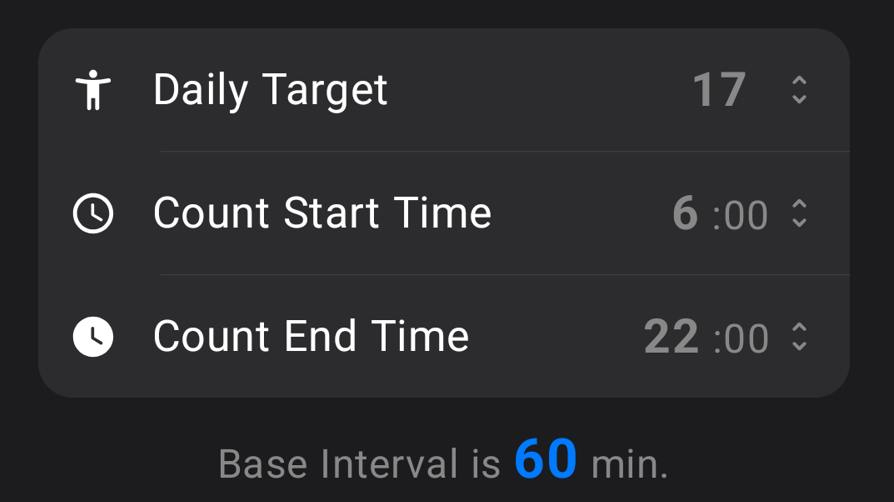
The Base Interval is a reference smoking interval calculated so that, by using it as a guide during the Count Period, you can stay within your Daily Target by the Count End Time.
For example, if you set your Daily Target to 17 cigarettes and your Count Period to 6:00–22:00 (16 hours = 960 minutes), your Base Interval will be 60 minutes.
Using this Base Interval as a guide for managing your smoking pace is the basic approach to staying within your Daily Target and avoiding “smoking too much.”
However, in everyday life, you may not always be able to smoke at exactly the same interval. To account for these variations in your actual smoking intervals, SmokeTimes adjusts the time until your next cigarette as the Target Interval (shown as “Interval” in the app) and guides you with the Next Time.
3 Start Cutting Down with SmokeTimes!
Once you have finished the settings, use the Next Time provided by the app as a guide and begin adjusting your actual smoking pace.
The basic idea is to smoke within the Count Period and when the Next Time has arrived.
3-1 Use the “Next Time” as Your Smoking Pace Guide
(1) Check Before You Smoke
✔️ Are you currently within your Count Period?
Whenever possible, try to smoke within the Count Period you have set. You can still record cigarettes outside the Count Period, but doing so can affect your smoking pace for the day in the following ways.
Smoking before the Count Start Time:
This can make the Target Interval during the Count Period longer.
Smoking after the Count End Time:
This simply increases your total cigarette count for the day and may raise your Daily Average.
✔️ Has the “Next Time” arrived?
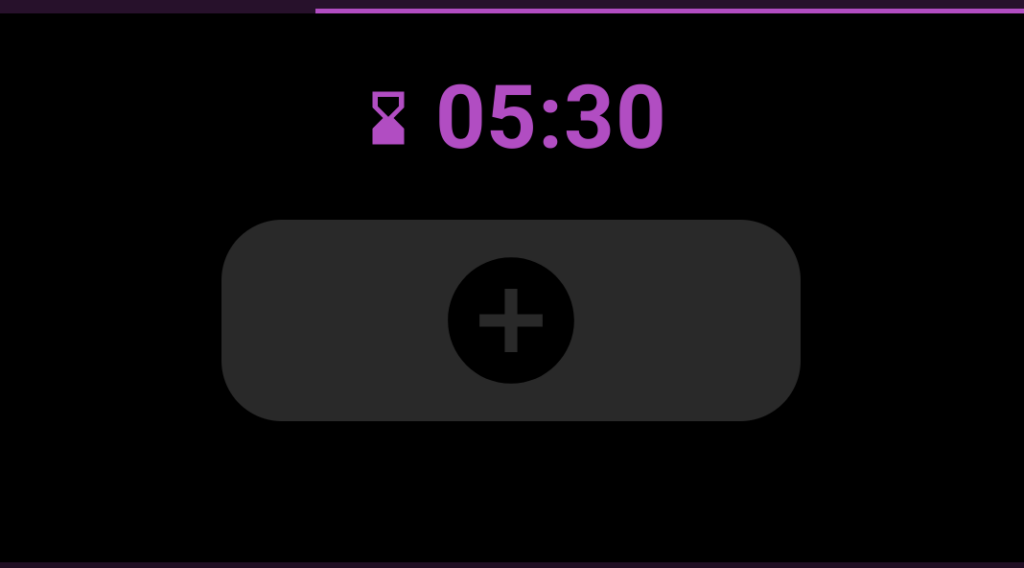
If it has not arrived yet:
The countdown timer and progress bar are still running. Whenever possible, try to wait until the countdown finishes before smoking.
If you tap the Count button during this time, a confirmation dialog will appear.
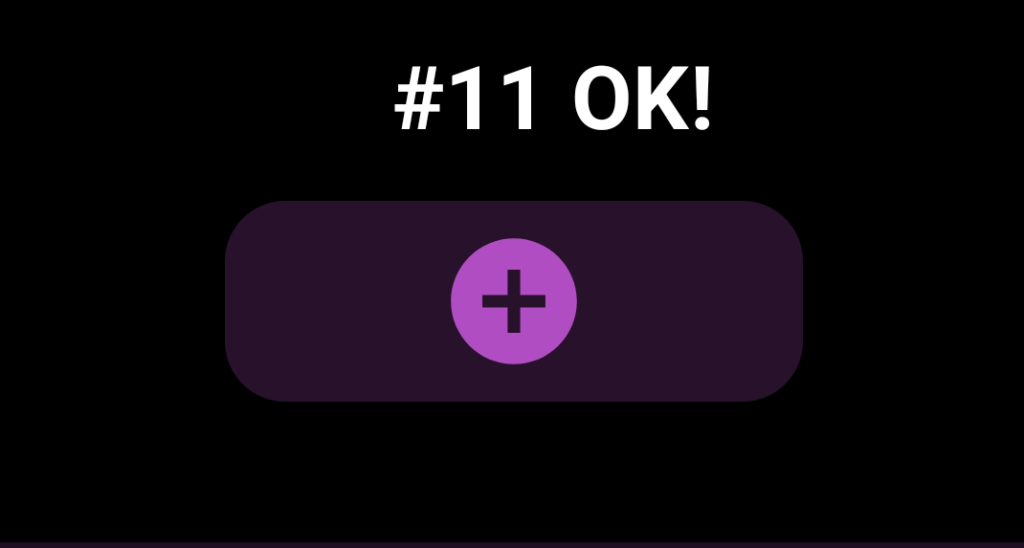
If it has arrived:
The countdown ends and the display changes to “Cigarette No. ○ OK!”
Use this as a guide for when to have your next cigarette.
✔️ Will this exceed your Daily Target?
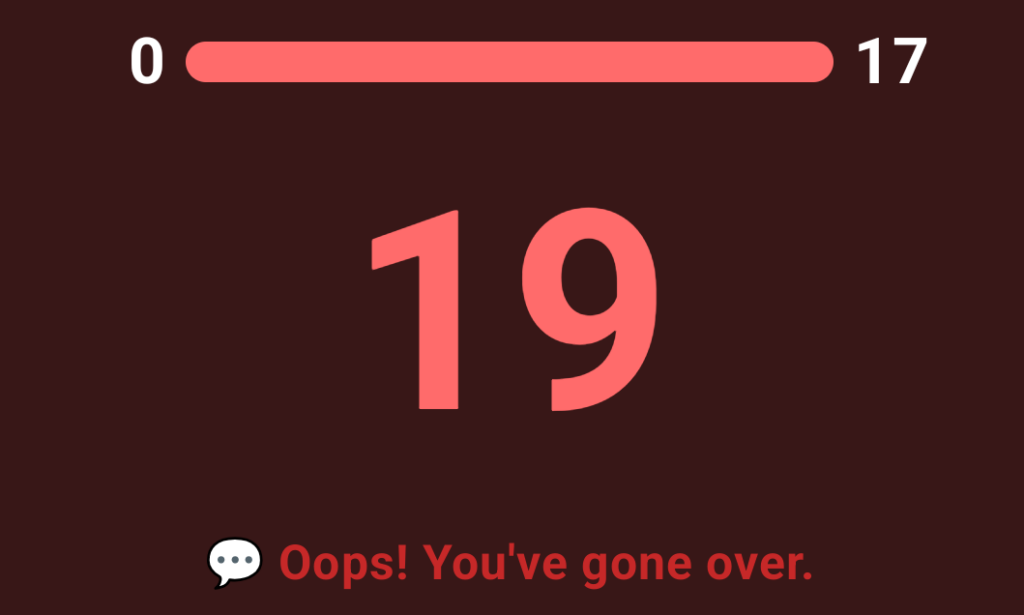
You can still record cigarettes even after exceeding your Daily Target. However, once you go over the target, that day’s record will be marked as “Over Target.”
(2) Record Your Cigarette and Check the “Next Time”
- Tap the Count Button
Tap the Count button at the bottom of the main screen to record your cigarette.
The maximum number of cigarettes that can be counted and recorded in a single day is 30. You cannot record more than 30 cigarettes per day. - Check the “Next Time”
When you tap the Count button, SmokeTimes recalculates the Target Interval and Next Time based on your smoking activity so far, the remaining time, and the number of cigarettes remaining within your Daily Target.
In everyday life, you may not always be able to smoke exactly according to the Base Interval. For this reason, each time you record a cigarette, SmokeTimes adjusts your pace from that point onward and provides a new Next Time to help you stay within your Daily Target.
Use this Next Time as a guide for your next cigarette.
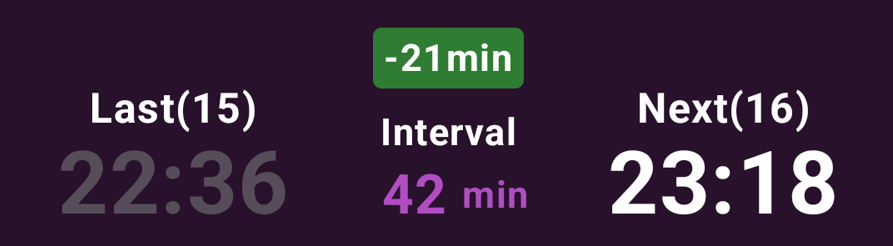
Last + Target Interval = Next Time
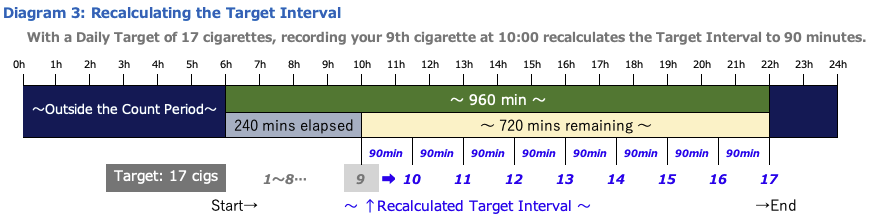
(3) Check Your Smoking Pace During the Day
SmokeTimes lets you review your smoking pace for the day from three perspectives: your cigarette count, your pace going forward, and each individual smoking interval.
❶ Is Your Current Cigarette Count Too High? (Progress Pace)
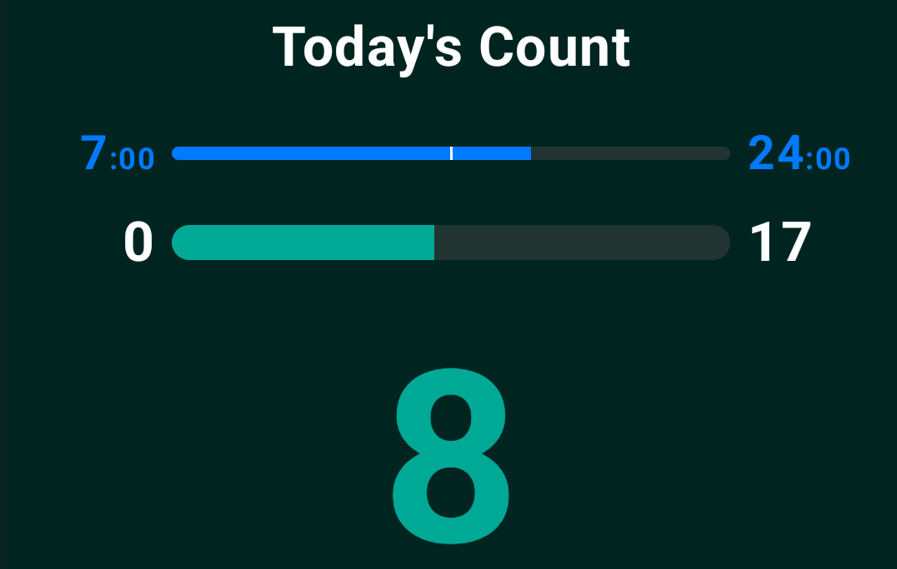
This indicator gives you a quick way to check whether your current cigarette count may be too high by comparing the progress of the day with the progress of your cigarette count.
The two bars at the top of the main screen let you compare how far the day has progressed with how far you have progressed toward your Daily Target.
For example, if your cigarette-count progress is ahead of the time progress, it means your cigarette count is currently running ahead of the time of day.
❷ Do You Have Room in Your Smoking Pace Going Forward? (Pace Badge)

The Pace Badge shows how much time you can allow between cigarettes from your current smoking time until the Count End Time, compared with your Base Interval, while still staying within your Daily Target.
Each time you record a cigarette, SmokeTimes calculates a new Target Interval based on the remaining time and the number of cigarettes remaining within your Daily Target. The difference between this Target Interval and the Base Interval is displayed as a ±○ min badge.
This lets you see whether you have some flexibility in your pace going forward, or whether you need to slow down.
🟩 Green background with “-○ min”:
You have enough room to continue at intervals that are ○ minutes shorter than the Base Interval and still stay within your Daily Target.
No badge displayed:
Your pace going forward is in line with the Base Interval.
🟨 Yellow background or 🟥 red background with “+○ min”:
You need to continue at intervals that are ○ minutes longer than the Base Interval in order to stay within your Daily Target.
❸ Want to Check Each Smoking Interval? (Base Interval Badge)
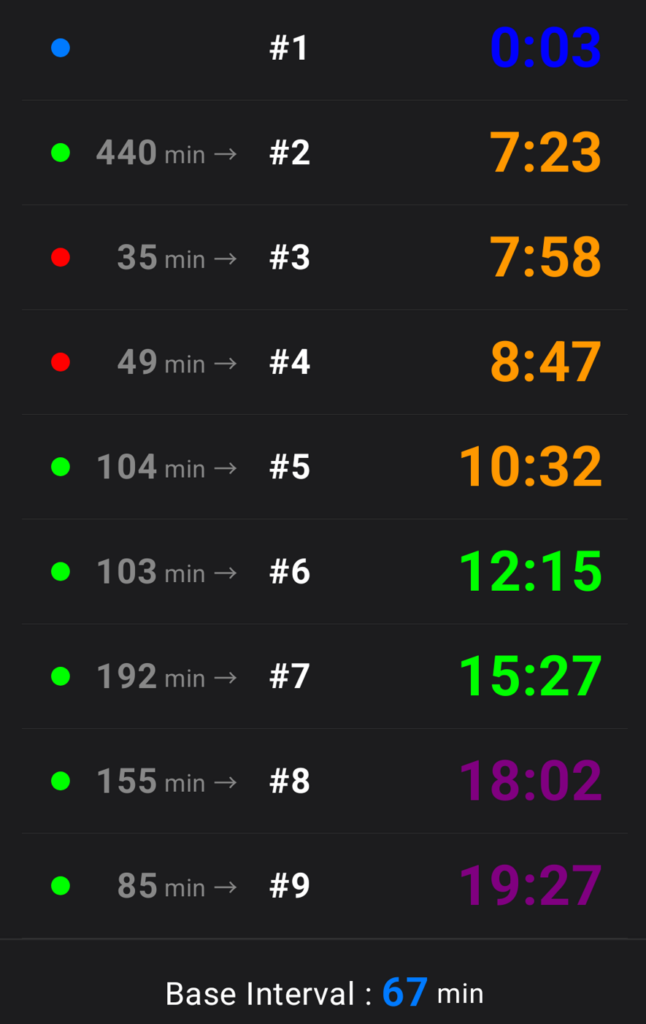
The Today history list displays a Base Interval Badge for each recorded cigarette. This shows whether the time since your previous cigarette was longer or shorter than your Base Interval.
By reviewing these badges, you can look back on patterns in your smoking habits at different times of day—for example, whether your intervals tend to be shorter in the morning or longer in the afternoon.
Smoking times are also color-coded by time of day.
(Badges)
🔵 Blue badge: Smoking recorded outside the Count Period.
🟢 Green badge: Smoking interval longer than the Base Interval.
No badge: Smoking interval in line with the Base Interval.
🔴 Red badge: Smoking interval shorter than the Base Interval.
(Smoking Time Colors)
🕛 0:00–6:59: Blue
🕖 7:00–11:59: Orange
🕛 12:00–17:59: Green
🕕 18:00–23:59: Purple
3-2 Review Your Smoking Records
As your smoking records build up, take some time to review them occasionally. In SmokeTimes, you can check trends in your cigarette count and smoking pace from the Today, Monthly, and Yearly screens.
By looking back at your records, you can identify patterns in your smoking habits, such as what times of day your pace tends to become faster, whether you are staying within your Daily Target, and how your cigarette count has changed compared with the past.
(1) Today Screen
On the Today screen, you can view a list of your smoking times and actual smoking intervals for the day.
Using the Base Interval Badges described above, look back on your smoking pattern for the day—for example, which times of day your smoking intervals tend to become shorter and which times of day you are able to keep them longer.
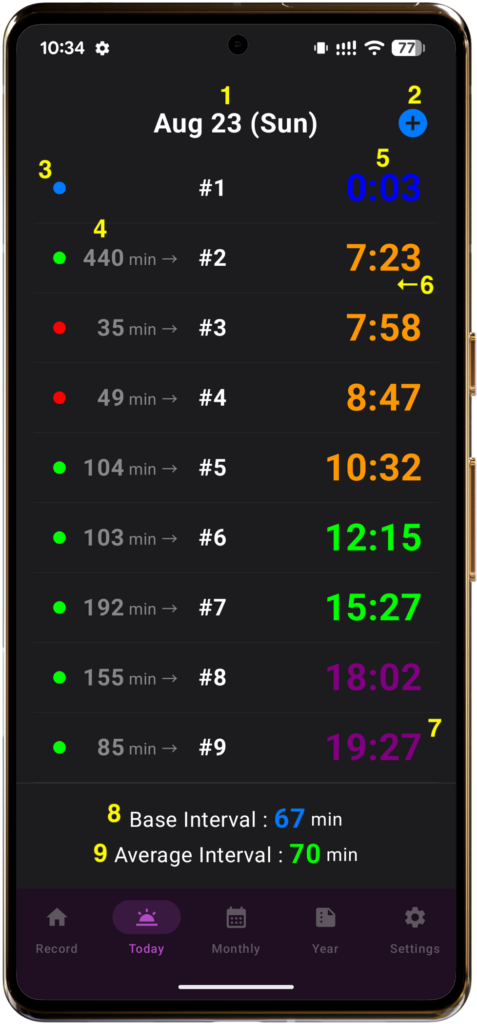
- Today’s Date
- Add Time Button:
If you forget to record a cigarette, tap this button to open a sheet where you can add the smoking time manually. - Base Interval Badge
- Actual Smoking Interval
- Actual Smoking Time
- Swipe to Delete:
You can delete individual records by swiping them. - Auto-Scroll:
When the list becomes long, it automatically scrolls so that the latest record appears at the bottom. - Base Interval
- Average Interval:
This shows the average of today’s smoking intervals. In addition to reviewing individual records, you can use it as a reference for looking back at your overall smoking-interval pattern throughout the day.
This value is calculated using a custom method that takes several factors into account.
(2) Monthly Screen
On the Monthly screen, you can check your daily cigarette count and Daily Average.
Compare each day’s record with your Daily Target to see whether you are staying within your target, and review the overall trend in your cigarette count throughout the month.
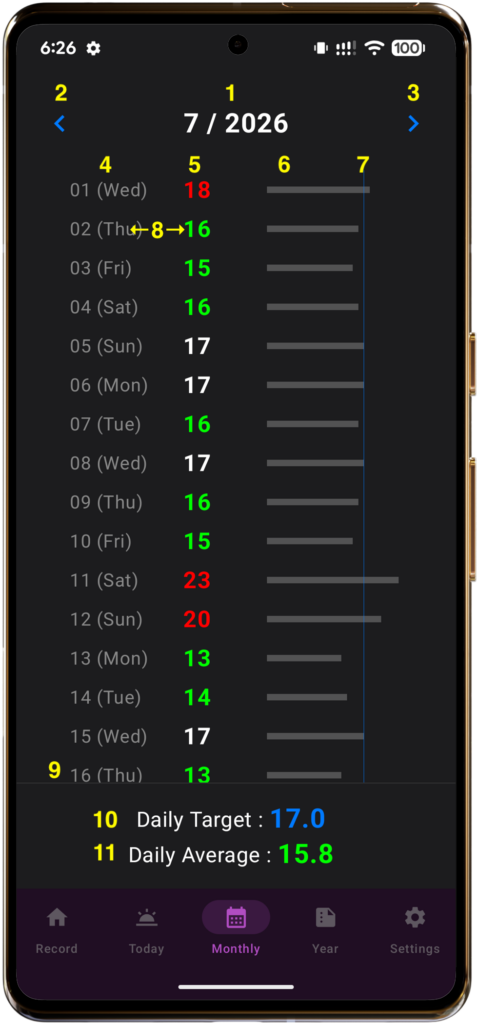
- Displayed Month
- Previous Month Button
- Next Month Button
- Date:
Today’s cigarette count is also updated in real time. - Daily Cigarette Count:
The relationship between your current Daily Target and the number of cigarettes recorded that day is shown by color.
・Below Daily Target: Green
・Daily Target achieved: White
・Over Daily Target: Red - Cigarette Count Graph:
The number of cigarettes smoked each day is shown as a bar graph. The maximum is 30 cigarettes. - Daily Target Line:
The position of your Daily Target is shown as a blue vertical line on the cigarette count graph. By comparing each day’s bar with this line, you can quickly see whether you stayed within your Daily Target. - View Past Smoking Records:
Tap anywhere on a date row to open the Past Smoking Records sheet for that day. - Auto-Scroll:
When the list becomes long, it automatically scrolls so that the most recent day appears at the bottom. - Daily Target
- Daily Average:
This shows your average daily cigarette count for the month. By comparing it with your current Daily Target, you can see whether your average for the month is staying within your target.
・Below Daily Target: Green
・Daily Target achieved: White
・Over Daily Target: Red
(3) Yearly Screen
On the Yearly screen, you can compare the Daily Average for each month and review how your cigarette count has changed over a longer period.
Each month is color-coded according to how its Daily Average compares with your Daily Target, making it easy to see at a glance which months stayed within the target and which months exceeded it.
You can also check your monthly and yearly total cigarette counts, along with the estimated number of packs purchased, calculated on the basis of 20 cigarettes per pack.
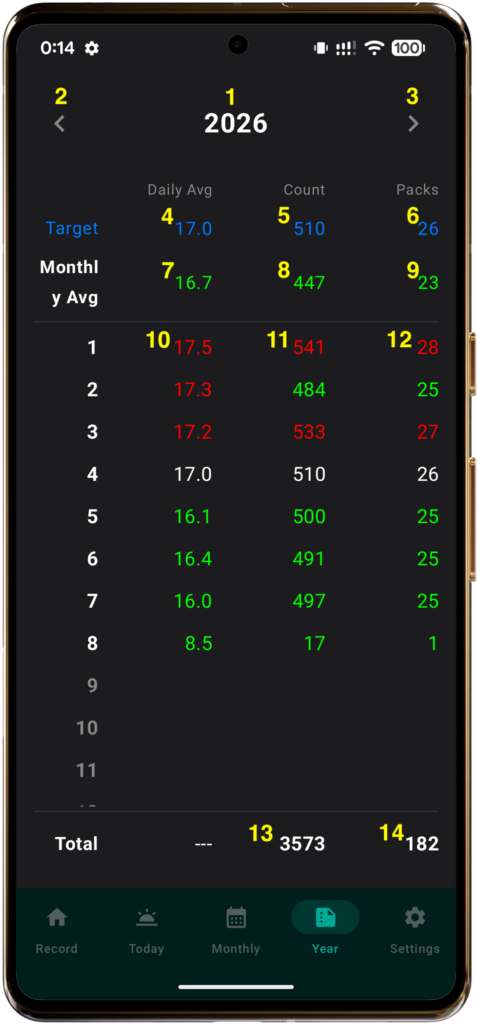
- Displayed Year
- Previous Year Button
- Next Year Button
- Daily Target
- Monthly Target Count:
Calculated as Daily Target × 30 days.
A fixed 30-day month is used for this calculation. - Monthly Target Packs:
The Monthly Target Count above is converted into packs, based on 20 cigarettes per pack. - Yearly Daily Average:
The average number of cigarettes smoked per day across the year. - Average Monthly Count
- Average Monthly Estimated Packs
- Monthly Daily Average:
The average number of cigarettes smoked per day for each month. It is color-coded according to how it compares with your Daily Target.
・Below Daily Target: Green
・Daily Target achieved: White
・Over Daily Target: Red - Monthly Total Count
- Monthly Estimated Packs
- Yearly Total Count
- Estimated Yearly Packs
4 Additional Information
4-1 Review Your Daily Target Regularly
As you continue using SmokeTimes, you may notice changes in your daily cigarette count and smoking intervals over time.
First, try to continue staying within your current Daily Target. Once you can do so comfortably, review your records on the Monthly and Yearly screens and consider whether your current Daily Target still matches your smoking habits.
If you have become able to stay consistently below your current target, you can choose to lower your Daily Target slightly and move on to the next goal.
However, there is no need to lower your Daily Target if you do not want to. Keeping your current target and continuing to avoid “smoking too much” is also one way to use SmokeTimes.
(1) Don’t Rely on the Records Alone
When reviewing your Daily Target, consider not only the Daily Average shown in the app, but also your actual smoking habits.
For example, if you sometimes forget to record a cigarette after smoking, there may be a difference between the number recorded in the app and the number you actually smoked.
If you decide to lower your Daily Target, we recommend choosing a number that feels manageable for you rather than relying only on the figures shown in your records.
(2) Use Baseline Mode Occasionally to Check Your Current Habits
When reviewing your Daily Target, or when you simply want to reassess your current smoking habits, you can also use Baseline Mode.
In Baseline Mode, pace-guidance features such as Next Time are paused. This allows you to record your natural cigarette count and smoking intervals without being influenced by the app’s guidance.
Try recording your usual smoking for a few days to about a week, then review your current smoking habits again. You can use the results as a reference when deciding whether to keep your current Daily Target or lower it slightly.
4-2 When Your Smoking Pace Becomes Much Slower
If your smoking pace becomes faster during the first half of the day, try to use the Next Time as a guide during the second half and allow more time between cigarettes. Even if your pace becomes somewhat faster earlier in the day, following the Next Time afterward can help adjust your smoking pace toward the Count End Time.
On the other hand, if you smoke relatively few cigarettes from the first half through the middle of the day and your pace becomes much slower than usual, there is one point to keep in mind.
SmokeTimes calculates the Target Interval based on the remaining time until the Count End Time and the number of cigarettes remaining within your Daily Target. As a result, if your actual cigarette count is much lower than your Daily Target, the Target Interval may become very short near the end of the Count Period.
For example, if there are 120 minutes remaining until the Count End Time and 6 cigarettes remaining within your Daily Target, the Target Interval is calculated as 20 minutes.
However, you do not need to smoke all the way up to your Daily Target. In a situation like this, there is no need to follow a shortened Target Interval just to reach the target number.
Instead, use your Base Interval as a reference.
If the Pace Badge in the center of the main screen shows “-○ min”, this means the Target Interval is ○ minutes shorter than your Base Interval. By adding those ○ minutes to the displayed Next Time, you can check the next smoking time based on your Base Interval.
Last + Base Interval = Next Time based on the Base Interval
In this way, on days when your smoking pace is much slower, you do not need to follow the short Target Interval shown by the app. You can instead use the Base Interval as a guide and simply finish the day with fewer cigarettes.
4-3 Other Specifications
- Theme Color Changes with Your Smoking Progress
The background and theme colors on the main screen change automatically according to your cigarette-count progress for the day.
・0–50%: Smoke Green
・51–100%: Smoke Purple
・101% or higher: Smoke Red - Scrollable Layout Based on Screen Size (Android Version)
On devices with a shorter screen height (approximately 640dp or less), or when the device’s font size or display size is set larger, the upper information area of the main screen becomes scrollable to maintain the layout. - The Record Screen Appears When the App Is Reopened
Even if you move the app to the background or close it while viewing a screen other than the Record tab, the app will reopen on the Record screen the next time it is launched. This allows you to quickly tap the Count button and record a cigarette. - Portrait Orientation and Dark Mode
Regardless of your device settings, the app is fixed to portrait orientation and dark mode. - Screen Layout Makes It Easy to Check the Current Time
While using the app, the current time remains visible in the status bar at the top of your smartphone. If you are unsure whether you have already recorded a cigarette, for example, you can compare the current time with the Last time shown in the app. - Timers Pause in the Background
The app’s timers stop running while the app is in the background. When you open the app again, they are recalculated and displayed based on the current time. This means the timers do not need to run continuously in the background. - Haptic Feedback
When you tap the Count button, the app provides vibration feedback so you can feel that the action has been registered. - Design That Avoids Direct Tobacco Imagery
To avoid making the act of opening the app itself strongly associated with smoking, the design uses as little direct tobacco- or smoking-related imagery as possible and instead focuses on the information needed for smoking management.
4-4 About Purchasing
The Android version of SmokeTimes is available for download from the Google Play Store.
Now available in: 🇺🇸 United States / 🇬🇧 United Kingdom / 🇨🇦 Canada / 🇦🇺 Australia / 🇳🇿 New Zealand / 🇯🇵 Japan
- App price:
See Google Play for pricing in your country or region
One-time purchase - No monthly fees or additional charges
- No ads

The iOS version of SmokeTimes is not currently available. A release date has not been determined as of August 2026.